
2026 Site Logs: Digital Proof with QR & Geofencing
Jump To...

Who this is for
- Principal contractors, project managers and site managers on UK construction and fit out sites
- Compliance, H&S and quality leads who need audit proof logs for HSE, BSR and insurers
- Developers, asset owners and client reps responsible for higher risk buildings (HRBs) and complex commercial projects
- SMEs ready to move beyond paper sign in sheets without buying a bloated enterprise system
What this guide covers
- What 2026 UK rules and insurer expectations actually demand for visitor and workforce logs
- How QR codes plus geofencing create “proof of presence” without defaulting to biometrics
- A lean, end to end workflow from gate sign in to muster, incident evidence and export for audits
- Common pitfalls with GPS, GDPR and “buddy punching” and how to avoid them
- Platform options and a simple decision lens for HRBs vs non HRBs
Why paper sign in sheets are now a liability
On a quiet day, a paper visitor book feels harmless. The problem appears the moment something goes wrong: a fire drill, a RIDDOR report, an insurer probing a claim or a resident launching a Building Safety Act complaint years after completion.
Under the Building Safety Act’s golden thread rules, higher risk buildings must keep key safety information in a secure, digital, auditable format. HSE guidance for construction and CDM 2015 is clear that everyone on site must be inducted and that records must be retrievable, time stamped and usable for roll call.
Insurers have quietly raised the bar too. To defend claims in a world of 15 to 30 year liability windows, they increasingly expect digital logs that can be exported instantly, tied to induction status and (where relevant) right to work and competence checks. Paper that lives in a filing cabinet or damp site office is no longer credible evidence.
The good news: you do not need biometrics on every gate. A well designed QR plus geofence workflow, backed by a modern visitor and workforce platform, gets you most of the benefit with far fewer GDPR headaches.

The compliance bar in 2026: what “good” looks like
Think in terms of evidence. If an HSE inspector or Building Safety Regulator (BSR) case officer asked “who was on site, doing what, under which controls, on this date three years ago?”, could you answer in minutes, not days?
A compliant digital log should give you:
- Who: unique identity for every person on site, linked to role, employer and, on many sites, CSCS or equivalent competence data via tools such as CSCS Smart Check.
- Where and when: time stamped entry and exit, with geofence validation that they were physically within the site boundary.
- Status: induction completed, briefings signed, permits or RAMS accepted, right to work confirmed where applicable.
- Emergency view: real time muster list for fire or major incident, with the ability to export that muster as evidence afterwards.
- Retention: logs securely stored for 15 years on HRBs and long running commercial projects, aligning with the Building Safety Act’s extended claims periods on defects and building safety.
The Health and Safety at Work etc Act and HSE’s construction guidance still focus on outcomes rather than specific tools. But once you combine extended liability with mandatory occurrence reporting to the BSR for HRBs, digital and auditable is the only realistic way to stay defensible.
How QR + geofencing gives you “proof of presence”
The point of digital site logs is not to create another admin chore. It is to create irrefutable, low friction proof that the right people were on the right site, under the right controls.
A robust pattern looks like this:
Geo fenced perimeter
You define a precise site boundary using GPS coordinates inside your visitor/workforce platform. Devices must be within this area to complete a check in.Physical QR at the gate
A dynamic QR code is displayed at controlled entry points. Workers and visitors scan it using a mobile app or browser. The system checks both the QR token and their live location inside the geofence before logging them in.Automated checks on scan
On scan, the system can:- Confirm induction completion and briefing acknowledgements
- Check card or competency via API (for example CSCS Smart Check)
- Flag expired credentials or lapsed training
- Tie workers to RAMS or permits for higher risk activities
Logged once, re used across workflows
The same event powers your attendance record, time and attendance, muster list and incident evidence. No duplicate data entry, no conflicting versions of “who was here”.
For a visual explanation of how QR and geofencing combine, the YouTube breakdown in QR Code Geofencing is worth 10 minutes. It mirrors exactly what leading UK construction platforms are now implementing on live sites.

Platform options: from tier 1 to SME
Several UK ready platforms now make this workflow realistic, rather than a custom IT project.
- MSite (Infobric): the default for many tier 1s and HRBs, with geo fenced check in and out, QR/NFC and biometric options, live muster, right to work and close links into Procore and Autodesk.
- innDex: strong on geofenced sign in, mobile first inductions and RAMS, popular with housebuilders and flexible contractors.
- CausewayOne (Donseed) and Biosite: timesheets, roll call, biometric plus GPS where the risk profile justifies it.
- Collabor8Online: QR sign in and digital inductions targeted at SMEs without app fatigue.
The decision lens is simple:
- HRBs and major civils jobs: pick a platform that can plug directly into your golden thread common data environment and carry 15 year retention by design.
- Regional contractors and fit out: start lean with QR sign in, live muster and induction links, then add geofencing and deeper integrations as you scale.
To sense check what others are running in the wild, communities like r/ConstructionUK and r/ukconstruction are useful reality checks on what works on muddy boots projects, not just sales decks.
A practical end to end workflow that stands up in an audit
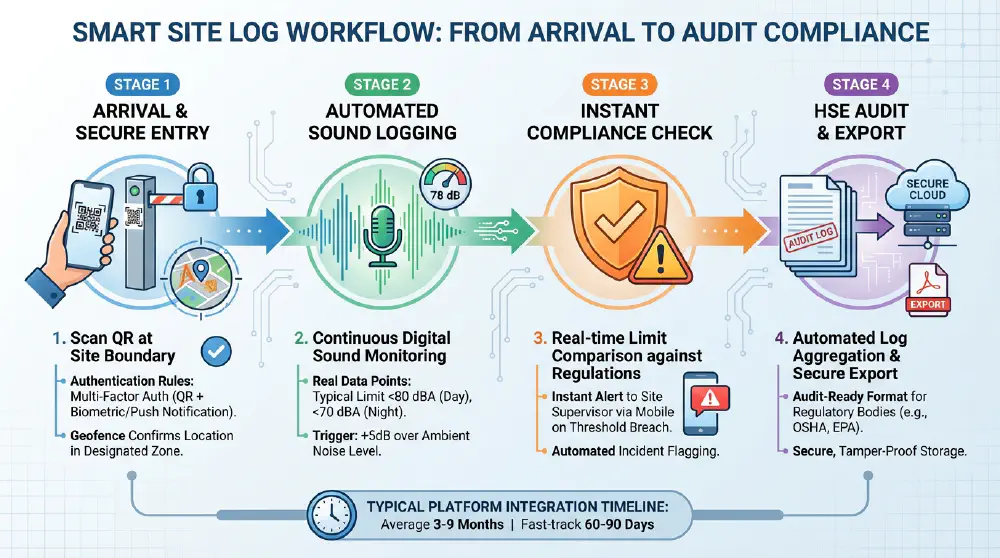
A defensible digital log is less about the shiny app and more about the sequence. A typical 2026 ready pattern for a UK site:
Pre start: digital induction and privacy notice
Workers receive an induction link before arriving, complete it on mobile and accept a clear privacy notice that sets out lawful basis, data use and retention, aligned with ICO guidance on the right to be informed.Arrival: QR scan inside a geofence
At the gate, they scan a time limited QR code. The platform verifies they are physically inside the geofence, validates induction status and, for contractors, checks CSCS or equivalent. Failed checks trigger an alert for the site manager.On site actions: equipment, sound and briefings
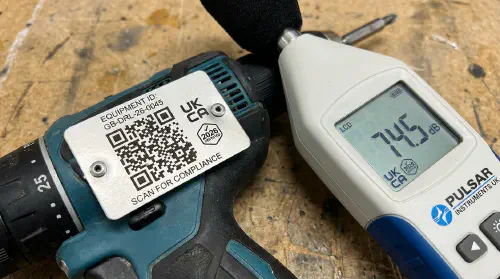
QR or NFC tags on noise critical plant log who is operating what, with dB readings where relevant for local authority or neighbour disputes. Toolbox talks and high risk RAMS briefings are signed on mobile, tied back to the attendance log.
Emergency: live muster
Fire alarm triggers a muster mode showing who is logged in, when they entered and whether they have been checked off at an assembly point. That muster list is then saved as part of your emergency plan evidence, meeting expectations laid out in modern visitor management guidance.Incident: immediate evidence package
If you log a near miss or notifiable event under mandatory occurrence reporting on HRBs, the system can bundle who was on site, what equipment was in use, which RAMS were accepted and associated photos into an exportable packet. This is where QR, geofence and site photography combine into a compelling defence file.Export: golden thread and insurer pack
At handover or year end, you export attendance, induction, muster and incident logs into your golden thread CDE following ISO 19650 naming. For non HRBs, you at least archive data for 7 to 15 years in a UK or EU hosted environment.
If you are building out these flows, internal TrainAR content such as Automate HSE Safety Alerts Into WhatsApp And Teams Setup Scripts And A Tidy Audit Trail and Geofencing Timesheets On Construction Sites Auto Clock In Stop Buddy Punching And Stay Compliant gives you more automation detail without drifting into theory.
GDPR, biometrics and “buddy punching”
The two biggest objections site teams raise are privacy and spoofing.
On privacy, the ICO expects you to treat biometrics as high risk special category data. That means DPIAs, strong justification and genuine opt outs. For most projects, QR plus geofence is enough to achieve compliance proof without switching on face or fingerprint readers. Where you do use biometrics, always provide an equivalent QR/NFC route and keep privacy notices front and centre at kiosks.
On spoofing, crews scanning QR codes from home or the van on the road is a valid concern. Close that gap by:
- Restricting sign in to devices physically inside the geofence
- Using short lived, rotating QR tokens so screenshots are useless
- Pinning scanners at controlled choke points rather than free floating posters
The impact of getting this wrong is not just admin. Poorly controlled logs weaken your whole evidence chain if you ever have to defend a prosecution or civil claim. For a wider look at independent, time stamped digital evidence and its role in compliance, the US focused but transferable Why Construction Sites NEED Third Party Drones for OSHA Compliance is a useful perspective on how inspectors think about proof.
FAQs
Is digital logging legally mandatory on every UK site?
Not explicitly. The golden thread requirement is specific to HRBs, and HSE rules focus on outcomes rather than a named technology. However, the combination of Building Safety Act liability windows, MOR duties and insurer expectations means that on anything beyond a minor job, not having digital, auditable logs is now a commercial and legal risk.Will HSE and insurers accept QR + geofence logs as evidence?
Yes, provided the logs are secure, time stamped and show a clear audit trail of checks and changes. Many major contractors already use platforms such as MSite and innDex as their primary evidence in investigations and renewal negotiations.Do we have to keep everything for 30 years?
For HRBs, aspects of the Building Safety Act create effective liability windows up to 30 years for certain defects. A pragmatic approach is to retain core visitor, induction and incident data for at least 15 years on HRBs and major commercial schemes, and no less than 7 years on other projects unless your legal advisers or insurers specify longer.What about subcontractors and occasional visitors who hate apps?
Most platforms now support QR in a browser or kiosk mode without forcing a full app install. The key is to make the first use experience quick: pre load inductions where you can, use simple identity verification and keep the mandatory fields lean.Where should digital logs sit in our wider golden thread?
For HRBs, they should live alongside design, fire and structural information within your chosen CDE, correctly tagged and versioned per the golden thread guidance. For non HRBs, aim for the same discipline; it is fast becoming a differentiator in framework bids.
Training and resources
Official guidance
- UK Government golden thread overview: https://www.gov.uk/guidance/keeping-information-about-a-higher-risk-building-the-golden-thread
- Building control and HRBs: https://www.gov.uk/guidance/building-control-approval-for-higher-risk-buildings
- HSE construction legal overview (CDM 2015): https://www.hse.gov.uk/construction/cdm/2015/legal.htm
- Mandatory occurrence notices and reports: https://www.gov.uk/guidance/submitting-mandatory-occurrence-notices-and-reports
- ICO guidance on privacy information: https://ico.org.uk/for-organisations/uk-gdpr-guidance-and-resources/individual-rights/the-right-to-be-informed/what-privacy-information-should-we-provide/
Platforms and case studies
- MSite (Infobric) workforce app: https://infobric.com/uk/en/platforms/msite/workforce-app/
- innDex workforce management and Autodesk integration: https://www.inndex.co.uk/news/workforce-management-inndex-autodesk
- Causeway workforce time and attendance: https://www.causeway.com/workforce/time-and-attendance
- Network Rail & Tended case study (geofencing wearables): https://www.tended.co.uk/case-studies/network-rail-western
- Paperless site case study, Eurovia: https://paperlessconstruction.co.uk/2025/02/03/case-study-uk-contractor-goes-paperless/
TrainAR internal reading
- Automate HSE Safety Alerts Into WhatsApp And Teams Setup Scripts And A Tidy Audit Trail
- Geofencing Timesheets On Construction Sites Auto Clock In Stop Buddy Punching And Stay Compliant
- 6 Photo Protocol For Site Evidence What To Photograph For Snagging And Disputes
- Digital Handover Hack QR Codes 2026 Fast Compliant Om Pack
Community and discussion
Want to slash training times and increase revenue per Engineer? Join our Waitlist: https://trainar.ai/waitlist
Ready to Transform Your Business?
Turn every engineer into your best engineer and solve recruitment bottlenecks
Join the TrainAR Waitlist