
AI Snagging Tools 2026: Photo-to-Issue Workflows for UK Trades
Jump To...

Picture a UK site at first light, with supervisors using tablets while tagged defects float over the frame: that is the practical reality this guide is designed to help you build, where every visit generates usable, compliant snag data in the background.
Who this is for
- UK main contractors, specialist trades and SMEs working on HRBs or complex commercial jobs.
- Site managers, quality leads and building safety managers responsible for snags and evidencing the Golden Thread.
- Owners and Ops leads who want to cut admin time while tightening compliance under the Building Safety Act and HSE expectations.
What this guide covers
- The 2026 AI photo tagging tools worth your time, and what they actually do on site.
- A lean end to end workflow: photo capture, AI tagging, review, issue creation and close out.
- How to stay inside UK GDPR and Golden Thread requirements while using AI on site.
- Cost, accuracy and where AI beats paper snag sheets without pretending to replace human judgement.
Why AI snagging has stopped being a science project
The combination of the Building Safety Act, Golden Thread duties and day to day HSE obligations has turned vague “we took some pictures” evidence into a liability. Regulators, clients and insurers are increasingly expecting structured, searchable records that link a specific issue to a time, place, element and fix.
Manual photo folders and spreadsheet snag lists simply do not scale on live HRB or multi plot housing work. Over the last 18 months, that gap has been filled by AI driven photo tagging: platforms that ingest your 360 degree walks or mobile photos, auto label likely defects, and create action ready issues in your CDE.
Across UK case studies, site teams are reporting 50 to 70 percent time savings on snag capture and review, and higher detection rates compared with paper lists. The point is not to sack clerks of works, but to ensure they miss less and prove more with the same hours on site.
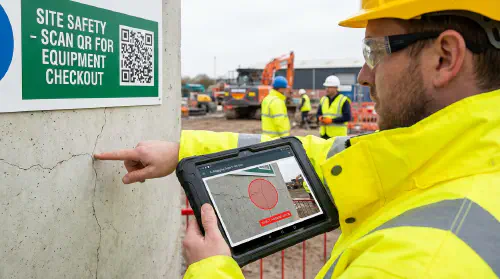
This shot of a UK site manager checking AI tagged snags on a tablet is a useful mental model for where you want to end up: one walk, shared evidence, and a live defect list that updates itself as the job moves.
The current toolset: where to start in 2026
Several platforms now provide UK ready AI tagging, rather than lab demos.
OpenSpace Visual Intelligence is the frontrunner for 360 degree based workflows. After its 2025 Spatial AI upgrade and the acquisition of Disperse, it can turn a daily walk into a time lined visual record with suggested issues, aligned to plans or BIM. Contractors such as Skanska and Sweet Projects are using it to generate “tamper proof” histories for quality and dispute defence.
Procore Photo AI is the natural choice if your business is already embedded in Procore. Site photos dropped into the platform are auto labelled with defect categories and linked straight into Procore Issues and the Daily Log, which keeps everything inside your existing processes.
Autodesk Construction Cloud layers AI over its CDE. Construction IQ models scan images and metadata for high risk items, flagging potential quality or safety defects and surfacing the ones most likely to hurt you in Building Control conversations later.
For lighter SME friendly deployments, PlanRadar SiteView uses 360 helmet camera walks to pre tag rooms and floors, then applies AI to issues. Trials and feedback in the UK point to a 60 to 70 percent reduction in time to complete a defect walk compared with manual methods.
If your work is heavily coordinated from BIM on complex MEP or structure, XYZ Reality goes further into AR quality inspection, overlaying model intent on what is built and logging defects against specific elements. Pricing is higher and best suited to large HRB or critical infrastructure.
If you are curious about the underlying techniques, Tim Fairley’s long form explainer on AI defect detection is worth a watch:
For a more product focused demo on automated image labelling, this walkthrough of AI powered photo tagging shows what “photo to defect” looks like on screen:
Building a clean photo to issue workflow
A workable 2026 AI snagging workflow has seven moving parts. The art is to keep them lean and standardised.
Capture on site
You need consistent, geo anchored image capture:
- 360 degree cameras for scheduled walks on HRBs or large blocks.
- Mobile photos for detail and ad hoc issues.
- QR or room codes at doorways and key plant locations so each image can be resolved to a location in your CDE.
Disciplined capture is what makes AI useful. The model is only as sharp as the angles, lighting and coverage you give it.
Ingest into your CDE
Next, sync everything into a single Common Data Environment such as Autodesk Construction Cloud, Procore or PlanRadar, ideally aligned to ISO 19650 naming and metadata.
At this point, privacy controls should already be applied:
- Automatic face and number plate blurring on upload.
- Clear separation between public perimeter images and internal space captures.
- Access controls driven by project role, not who shouts loudest.
This is where a lot of smaller firms fall foul of UK GDPR. The ICO guidance on data use and new Data Use and Access Act material is explicit that systematic site imaging is high risk processing, which triggers a need for a documented DPIA.
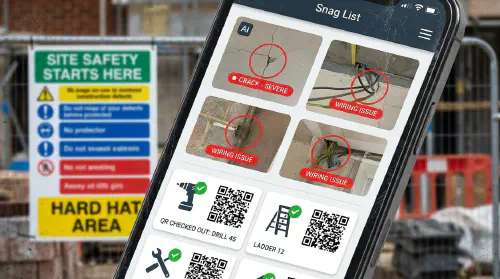
Use this close up of an AI labelled defect on a phone as a reminder that every annotated image is personal data if it includes people or signage, so your workflow has to bake in blurring and role based access from the start rather than as an afterthought.
AI tagging and human validation
With images in place, AI tagging engines scan for:
- Common finishes and fabric defects such as cracks, incomplete second fix, damaged surfaces or missing fire stopping.
- MEP or plant anomalies like missing components or obvious misalignment.
- Progress states relative to expected model or programme.
Well trained workflows are achieving 81 to 93 percent F1 scores across common categories. The important point is where the human fits.
Every leading platform in this space is designed around human in the loop review. A coordinator or site manager reviews proposed snags, merges duplicates, rejects false positives and adds context such as trade responsibility, severity and target date. Over time, that feedback further sharpens the model for your typical work.
At this stage, you should be pushing issues into your main task system: Procore Issues, ACC Issues, PlanRadar tickets or similar. Rectification photos can run back through the same AI for “fix confirmed” checks, especially useful near PC or Sectional Completion.
If you want a deeper dive into day to day practices and risk, communities such as r/Construction and r/ConstructionTechnology have grounded discussions from site managers and VDC leads wrestling with similar setups.
Staying on the right side of UK GDPR and Golden Thread
AI photo workflows are not automatically non compliant. The ICO is clear that visual data is acceptable if you can show:
- A suitable lawful basis, which in construction is usually a mix of legitimate interests, contract and, for safety and Building Regulations compliance, legal obligation.
- A proportional DPIA that assesses the impact of routine imaging on workers, residents and visitors.
- Data minimisation, which means no casual audio recording, no creeping into neighbouring properties and deletion of images once they are no longer needed as evidence.
Retention is where many firms over collect. For snagging, a 12 to 24 month retention for working images is usually ample, with a subset promoted into long term Golden Thread records for HRBs.
For a more practical, training focused angle on evidence workflows, our piece on “Stop chargebacks on site photos, signatures and payment flows that protect your jobs” digs into structuring proof without over collecting data:
https://academy.trainar.ai/stop-chargebacks-on-site-photos-signatures-and-payment-flows-that-protect-your-jobs
Golden Thread obligations around higher risk buildings are still bedding in, but they all share one expectation: decisions and deviations should be traceable. AI photo tagging helps by making every snag and its fix visible in a time lined, location aware thread rather than buried in someone’s camera roll.
Cost, accuracy and where SMEs should start
Budget is often the deciding factor for smaller trades. Current UK pricing spans from roughly £95 to £250 per month per project for platforms such as OpenSpace, Procore, ACC and PlanRadar, with AR heavy tools like XYZ Reality priced per site at a higher bracket.
For most SMEs running one to three active projects, a realistic yearly budget is £1,500 to £3,000 to run AI tagging properly on at least one flagship job. That is typically less than the cost of a single extended delay or a defended claim.
Where you do not need full CDE integration, generic image APIs from hyperscalers can classify images for a few pounds per thousand pictures, but they lack construction specific tags and force you to glue everything together yourself. For live sites, the time you spend wiring up those APIs is usually better spent trialling a ready made product.
If you want to see how these AI workflows slot into wider digital operations, have a look at our internal guide “AI cash flow forecasting for trades: set it up with Xero or QuickBooks and GoCardless” which explores the same principle of plugging automation into existing systems rather than building from scratch:
https://academy.trainar.ai/ai-cash-flow-forecasting-for-trades-set-it-up-with-xero-or-quickbooks-and-gocardless
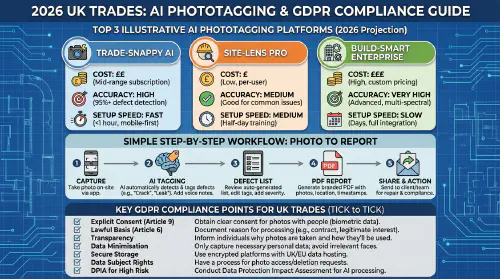
Refer to this cost and GDPR checklist style infographic as a quick sense check when you are shortlisting tools, balancing subscription tiers against compliance features like face blurring, data residency and retention controls.
FAQs
Does AI snagging replace clerk of works or site inspections?
No. It reduces the grunt work of trawling through photos and filling sheets, and it improves coverage, but you still need competent people to judge risk, agree remediation and sign off.
Is this worth it on smaller domestic or light commercial jobs?
If you are doing short, low risk works for known clients, a full AI workflow may be overkill. However, using structured photo evidence and basic tagging can still pay for itself the first time you resolve a dispute in minutes instead of hours.
What if the AI misses a critical defect?
You are still responsible. That is why validation is built in. Most errors tend to be duplicates or obscure items rather than missed obvious defects, but you should always dual run against traditional snagging for at least a month while you calibrate thresholds.
How do workers and residents react to more cameras?
Reactions are far better when you explain the “why” up front, keep cameras pointed away from private spaces, publish a clear privacy notice and show that faces and plates are automatically blurred. Surprises create resistance, not the tech itself.
Where can I learn more about AI in construction from practitioners?
Alongside vendor resources, the communities at r/Construction and r/ConstructionTechnology feature unfiltered threads on what actually works on UK and EU sites.
Want to slash training times and increase revenue per Engineer? Join our Waitlist: https://trainar.ai/waitlist
Training and resources
Primary sources used
- OpenSpace Visual Intelligence Platform overview and UK case material: https://www.openspace.ai/press-releases/visual-intelligence-platform
- Sweet Projects case study on 360 capture and dispute reduction: https://www.openspace.ai/resources/case-studies/sweet-projects-rolling-out-openspace-to-deliver-data-centres-on-time-and-with-confidence/
- OpenSpace UK & Ireland 2025 highlights: https://www.openspace.ai/blog/from-reality-capture-to-visual-intelligence-2025-highlights-from-team-uk-ireland/
- Procore Photo AI feature overview: https://www.procore.com/en-gb/whats-new/smarter-photo-management-with-ai
- Autodesk Construction Cloud AI workflows: https://construction.autodesk.co.uk/workflows/artificial-intelligence-construction
- PlanRadar SiteView product innovation shortlist: https://digitalconstructionplus.com/product-innovation-of-the-year-shortlist-2026/
- XYZ Reality quality inspection overview: https://www.xyzreality.com/resource-feature/quality-inspection
- Wates and Buildots progress and defect tracking interview: https://buildots.com/blog/wates-project-manager-using-ai-on-site/
- ICO guidance on the Data Use and Access Act and UK data protection: https://ico.org.uk/about-the-ico/what-we-do/legislation-we-cover/data-use-and-access-act-2025/how-we-will-regulate-as-the-data-use-and-access-act-commences/
- Golden Thread overview: https://www.gov.uk/guidance/golden-thread-of-information
- ISO 19650 overview (BSI): https://www.bsigroup.com/en-GB/iso-19650-building-information-modelling/
Recommended further reading and viewing
- Tim Fairley, “AI for defect detection, automation and compliance in UK construction” (YouTube, 2026) – practical tagging examples and risk commentary.
- 2025 AI driven photo tagging software demo (YouTube) – step by step “photo to defect list” workflow.
- TrainAR, “AI cash flow forecasting for trades: set it up with Xero or QuickBooks and GoCardless” – how to embed AI into finance operations alongside site workflows.
- TrainAR, “Stop chargebacks on site photos, signatures and payment flows that protect your jobs” – building robust, evidence rich processes that dovetail with AI snagging.
- Practitioner communities: r/Construction and r/ConstructionTechnology for live debates and field experience on AI adoption.
Ready to Transform Your Business?
Turn every engineer into your best engineer and solve recruitment bottlenecks
Join the TrainAR Waitlist