AI Snagging Tools 2026: Slash Site Defects with Instant Photo-to-Report Apps
Jump To...
Visualising an AI-first snagging workflow on a UK site, from photo capture through automated defect tagging to live crew tasking.
Who this is for
- UK builders, M&E contractors, fit‑out, repairs and maintenance firms with 3–50 staff.
- Site managers, supervisors and snagging inspectors fed up with photo dumps and Excel lists.
- Owners who need better evidence for the Golden Thread and HSE while keeping software spend under control.
- Trade businesses already using tools like Tradify, ServiceM8, Jobber, Procore or basic Google Workspace/Office 365.
What this guide covers
- The leading AI snagging and photo-to-report tools used by UK SMEs in 2025–2026.
- How to link AI snagging into job management, cloud storage and crew notifications without overcomplicating things.
- What you actually need for Golden Thread and HSE digital reporting (and what’s myth).
- A lean, practical workflow for small teams to cut snag close-out times by 60%+.
- Common pitfalls and misconceptions, with fixes based on real case studies.
Why 2026 is the tipping point for AI snagging
Snagging has always been a pain: hundreds of photos on someone’s phone, vague notes, drawings marked up in biro, then a Friday afternoon of copying everything into spreadsheets and emailing subbies. It slows handover, creates disputes and leaves you exposed when something goes wrong.
By 2026, that workflow is simply not competitive—or compliant.
New Golden Thread expectations for higher‑risk buildings and the push from HSE towards digital reporting mean you now need a clear, auditable trail of who found what, when, and how it was closed out. At the same time, AI photo‑to‑report tools have matured enough that small trades can get a serious productivity lift without enterprise‑level budgets.
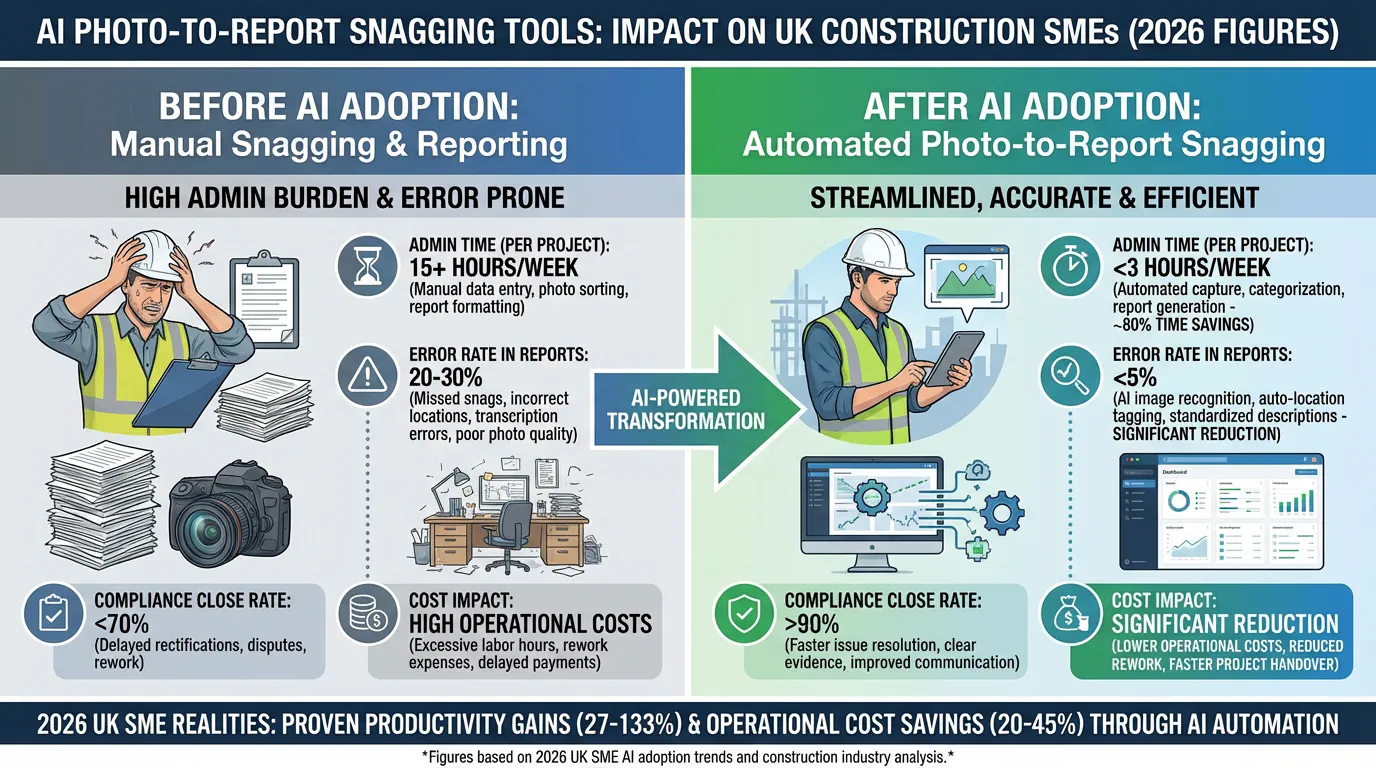
Across pilots and case studies, AI‑driven snagging has:
- Cut admin time per 50 snags from 8–12 hours down to 2–3 hours.
- Reduced record errors from around 18% to 2–4%.
- Driven 90%+ of defects closed within 72 hours on well‑run projects.
For many SMEs, this is the difference between firefighting and running a controlled, evidence‑rich quality process.

This conceptual workflow shows how photos move from the site through cloud-based AI analysis, then out to crews as clear, multilingual tasks—exactly the kind of loop SMEs can now build with modern snagging tools.
The current UK AI snagging toolkit for SMEs
You don’t need a Tier 1 budget to get serious AI into your snagging. The UK SME landscape in 2025–2026 looks roughly like this.
Core AI-first snagging and field tools
PlanRadar AI
Strong for AI‑assisted search and recommendations across historic snag data. Their SiteView feature supports 360° photo capture, making walk‑throughs much faster. Widely adopted by UK SMEs; pricing is typical SaaS (around £20–£55/month/user depending on tier).Procore Assist (Copilot)
For firms already on Procore, Assist brings AI search and reporting of punch lists, plus location detection for issues. The new reporting agent can automatically pull out trends from your defect data and is rolling through a UK beta with construction SMEs.OpenSpace Visual Intelligence
A leader in AI‑powered 360° capture. You walk the site with a camera; OpenSpace stitches and analyses the capture, enabling fast defect documentation and audit trails. Very popular with both Tier 1s and growing SME contractors because it’s genuinely mobile‑first.Dalux Field (Basic/Pro)
Clean, straightforward for SMEs. It integrates tightly with BIM models and common cloud platforms. Dalux Field Basic includes a free entry tier, so it’s ideal if you want to pilot AI‑supported snagging without a big upfront commitment.
SME-friendly snagging specialists
Snagmaster
UK‑built, with strong 3D model syncing and reporting tailored for smaller project teams. Solid if you already have model‑driven workflows.iSnag 2
Offline‑friendly and good for sites with patchy connectivity, with “intelligent drawings” and configurable workflows per trade.Housebuilder Pro and Snaggit (Nova AI)
Both are attractive for solo inspectors or small QHSE teams, with a tight image‑to‑snag pipeline and low per‑user cost—especially in residential and snag‑heavy environments.
Entry‑level pricing across these tools is typically £20–£55 per user per month, with Dalux Field offering meaningful capability on a free tier.

Here a site manager uses an AI-driven snagging app directly on site, turning a quick photo into a tagged, assigned defect with instant multilingual updates to the right trade.
Integrations that actually move the needle
Most marketing focuses on slick reports and dashboards. The real value for SMEs comes when photo‑to‑snag flows are wired directly into job sheets and crew updates, so defects are fixed before the next progress meeting.
The integration patterns we see working
Direct integrations and APIs
OpenSpace, PlanRadar and Dalux all integrate with platforms like Procore, Asite, Autodesk, Google Drive and SharePoint. A typical setup:- Photo captured in Dalux or PlanRadar.
- AI suggests category (e.g. cracked plaster, missing firestopping).
- A new task or issue is created automatically in Procore or your job management tool.
- Relevant documents (snag photo, plan location) are stored in a cloud folder that meets your Golden Thread needs.
Zapier/Make automations
For SMEs using Tradify, ServiceM8, Jobber or simple Google Sheets, low‑code tools fill the gaps:- New snag in PlanRadar → Zapier creates a job or sub‑task in Tradify and drops the link in a WhatsApp/SMS to the right engineer.
- Snag marked “resolved” → Drive or SharePoint folder updated with an “after” photo and timestamp, ready for HSE or client audit.
Multilingual crew notifications
PlanRadar, OpenSpace and Dalux now ship with multilingual notifications and crew assignment tools. That matters on UK sites with mixed language crews: the operative gets a simple, local‑language task with photo, location and due date rather than a confusing, English‑only PDF.
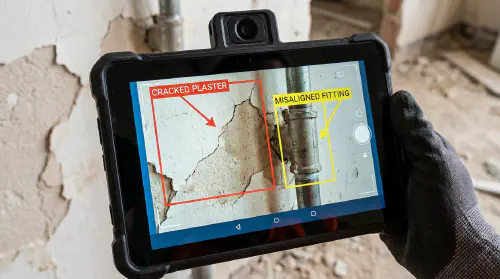
On modern devices, AI can highlight a crack or defect as you frame the photo, making it faster to capture the exact issue and attach the right context for your team.
If you want a deeper dive into how AI‑driven defect detection is built and where its limits are, the community AMA on r/learnmachinelearning is well worth a look: “I built an AI to detect defects in construction”.
Staying compliant: Golden Thread and digital HSE evidence
There is a lot of noise—and a fair bit of scaremongering—around digital compliance. It’s important to distinguish between what the regulators actually require and what software vendors would like you to buy.
Golden Thread: what matters, not what brand you use
For higher‑risk buildings in England, the Building Safety Regulator (BSR) requires a “Golden Thread” of information—a digital, single source of truth that is:
- Accurate, up‑to‑date and accessible.
- Secure and permissions‑controlled.
- Capable of being exported and handed over at Gateway 2 and 3.
The BSR’s guidance is clear that it does not mandate a single proprietary platform. Cloud storage is acceptable if you manage it properly. See the GOV.UK guidance on keeping information about a higher‑risk building for the full detail:
https://www.gov.uk/guidance/keeping-information-about-a-higher-risk-building-the-golden-thread
In practice, that means:
- Use structured folders (e.g. by project → level → area → trade → snag ID).
- Ensure your snagging tools can export data (PDF, CSV, IFC, or API outputs).
- Control access with role‑based permissions and offboarding when staff leave.
- Plan ahead for handover packages—not just daily convenience.
HSE and digital reporting
From 2026, the direction of travel is clear: digital evidence will be the expectation, not the exception. RIDDOR reports still go through the official HSE portal, but storing incident reports, photos and follow‑up actions digitally is now best practice.
See the HSE guidance on reporting incidents and dangerous occurrences:
https://www.hse.gov.uk/riddor/reporting/how-to-make-riddor-report.htm
Your AI snagging workflow should support this by:
- Capturing time‑stamped photos, location and responsible person.
- Linking H&S‑related snags (e.g. missing edge protection, blocked fire door) to incident logs.
- Producing an audit‑ready report when an inspector asks, without a week of admin.
If you’re interested in how training content and on‑site procedures intersect with these duties, our internal piece on Competence and digital training for building safety goes into the human side in more depth.
A lean photo-to-report workflow for small trades
Let’s turn this into a concrete, SME‑size workflow that uses AI without overcomplicating your life. We’ll assume:
- You use Dalux Field Basic or PlanRadar for capture.
- Your jobs live in Tradify/ServiceM8/Procore.
- You store records in Google Drive or SharePoint.
Step 1 – Capture on the walk, not in the office
On your snag walk:
- Use 360° capture where available (OpenSpace/Dalux) for fast coverage.
- Let the AI pre‑classify defects (e.g. finishes, M&E, fire, structural) as you take photos.
- Tag each snag with:
- Location (level, room, zone).
- Trade (internal, electrical, plumbing, firestopping).
- Severity/priority (e.g. safety‑critical vs cosmetic).
The goal is to come off the walk with already-labelled snags, rather than a loose gallery of photos.
Step 2 – Auto-generate tasks in your job system
Use built‑in integrations or Zapier/Make so that:
- New snag in PlanRadar (Trade = Electrical) → Task auto‑created in Tradify for the relevant engineer/team.
- Attach the AI‑suggested description and photo directly to the job card.
- Apply due dates based on priority—e.g. safety‑critical within 24 hours, cosmetic within 7 days.
This is where you win back most of your admin time: no more manual copying from Excel into job systems.
Step 3 – Notify crews in their language and channel
Your team will not log into five different apps. Meet them where they already are:
- Use the snagging tool’s multilingual notifications where possible.
- Mirror critical tasks into WhatsApp / SMS / email with direct links back to the defect.
- Keep messages short: one snag, one crew, one link.
The Reddit thread on r/UKHousing discussing the first official AI snagging app gives a good flavour of how frontline users react to this style of workflow and the importance of a simple mobile UX:
https://www.reddit.com/r/UKHousing/comments/1p9ry00/first_official_ai_snagging_app/
Step 4 – Close, verify, and lock into the Golden Thread
When a task is completed:
- Operative or supervisor captures an “after” photo in the same app.
- Status changes to “Resolved – pending verification”.
- A competent person (often the site manager or clerk of works) approves the closure.
Automate exports so that:
- Daily or weekly, closed snags are synced to a project folder in Drive/SharePoint.
- Each snag record includes before/after photos, timestamps, responsible party and notes.
- A single master log (CSV or database) links snag IDs to locations and actions, forming part of your Golden Thread record.
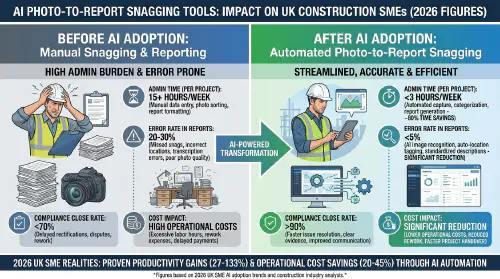
Use this before-and-after infographic as a benchmark: cutting admin from 12 to 3 hours per 50 snags and slashing record errors shows what a well-tuned AI workflow should be achieving by 2026.
For a visual walk‑through of how this looks day‑to‑day, this YouTube explainer is a strong primer on moving from manual snagging to app-based, AI‑assisted workflows:
Cost, skills and common misconceptions
Cost: start small, prove the value
Per‑user SaaS pricing can look steep when margins are tight, but UK SME data in 2025–2026 shows:
- Over 60% reduction in snag close‑out time and callout delays.
- 24–29% fewer costly repeats and quality‑related callbacks.
If you’re cautious:
- Use Dalux Field Basic or a low‑cost option like Snaggit for a pilot on one live job.
- Track three KPIs: admin hours per 50 snags, rework costs, average close‑out time.
- Only scale licences once the numbers justify it.
Our internal article on AI field workflows that pay back in one project breaks down how to structure that pilot and where to look for quick wins.
Skills: tools are ahead of training
Only around 12% of SMEs have invested meaningfully in AI upskilling. Most tools offer:
- Bundled onboarding and short tool‑specific training.
- Template workflows you can adapt per trade.
You don’t need data scientists—but you do need:
- One workflow owner who understands both site practice and the app.
- A clear playbook for how snags are raised, assigned, and closed.
Misconceptions to avoid
“We must use a specific Golden Thread platform.”
False. Regulators care about data quality, security and exportability, not brand names.“AI detection is 100% accurate.”
It isn’t. Today’s models are very good at flagging probable issues, but final sign‑off must sit with a competent person. AI should narrow your focus, not replace professional judgement.“Only big contractors benefit.”
The admin and rework savings are proportionally bigger for SMEs, because you’re freeing up owner‑operators and senior staff, not just a document controller.
For peer‑level comparisons of apps and real on‑site frustrations, the construction tech threads in r/punchlists_apps are refreshingly honest:
https://www.reddit.com/r/punchlists_apps/comments/1oi4kqx/discover_7_top_site_audit_punch_list_apps_track/
FAQs
Do I need 360° cameras, or will a phone do?
A modern smartphone is enough to start. 360° capture (via OpenSpace or Dalux) becomes valuable on larger, more complex jobs where comprehensive visual records help with claims and variations.
Is cloud storage like Google Drive really acceptable for Golden Thread?
Yes, provided it’s structured, permissions‑controlled and exportable. There is no requirement to use a specific commercial platform; see GOV.UK’s Golden Thread guidance for confirmation: https://www.gov.uk/guidance/keeping-information-about-a-higher-risk-building-the-golden-thread.
What happens if the AI mislabels a defect?
You correct it—just as you would with a junior inspector. Tools are designed so that re‑tagging and reassigning is quick. Over time, patterns in your data can even help vendors improve models for your trade mix.
Can I run this for domestic work and small jobs, or is it only for big projects?
AI snagging is increasingly common in housebuilding, refurbs and reactive maintenance, especially with tools like Housebuilder Pro and Snaggit. The key is to avoid over‑engineering the workflow: keep your status codes and templates simple.
Will this replace my clerk of works or QA manager?
No. It changes their role from data entry and chasing to oversight and verification. AI handles the repetitive tagging and listing; competent people still interpret, prioritise and sign off.
Want to slash training times and increase revenue per Engineer? Join our Waitlist: https://trainar.ai/waitlist
Training and resources
Core tools and case studies
- PlanRadar AI – UK‑relevant defect management and AI search: https://www.planradar.ai/
- Procore Assist (Copilot) – AI reporting and insights: https://www.procore.com/en-gb/whats-new/unlock-smarter-insights-with-the-new-copilot-reporting-agent
- OpenSpace Visual Intelligence and UK deployments:
- Dalux Field Basic – free tier for SMEs: https://www.dalux.com/en-gb/field-basic/
- Snagmaster: https://www.snagmaster.co.uk/
- iSnag 2: https://www.isnag.info/
- Housebuilder Pro (snagging feature): https://housebuilderpro.co.uk/2025/08/28/snag-smarter-not-harder-housebuilder-pros-snagging-feature-is-now-on-mobile/
- Snaggit app (Nova AI): https://www.snaggitapp.com/
- Buildots + Mace case study on AI saving 4,200 hours: https://pages.buildots.com/mace-case-study
Regulation and best practice
- Golden Thread guidance for higher‑risk buildings (GOV.UK): https://www.gov.uk/guidance/keeping-information-about-a-higher-risk-building-the-golden-thread
- Building Safety Regulator strategic plan 2023–2026: https://www.gov.uk/government/publications/building-safety-regulator-strategic-plan-2023-to-2026/building-safety-regulator-strategic-plan-2023-to-2026
- HSE RIDDOR reporting guidance: https://www.hse.gov.uk/riddor/reporting/how-to-make-riddor-report.htm
- Implementing the Golden Thread (Institution of Structural Engineers): https://www.istructe.org/resources/guidance/implementing-the-golden-thread/
Adoption, skills and market context
- SME digital adoption taskforce summary: https://www.gov.uk/government/publications/sme-digital-adoption-taskforce-interim-report/sme-digital-adoption-taskforce-summary-of-interim-report
- British Chambers of Commerce – SMEs and AI adoption: https://www.britishchambers.org.uk/news/2025/09/turning-point-as-more-smes-unlock-ai/
- NBS press release on AI adoption in construction: https://www.thenbs.com/about-nbs/press-releases/ai-adoption-surges-as-digital-anxiety-grips-the-construction-sector
- TechRadar overview of SMB struggles with AI training: https://www.techradar.com/pro/many-smbs-say-they-cant-get-to-grips-with-ai-need-more-training
- Digital Construction Awards finalists (digital innovation in H&S and wellbeing): https://digitalconstructionplus.com/digital-construction-awards-2025-finalists-digital-innovation-in-health-safety-and-wellbeing/
Community and explainers
- YouTube – explainer on manual vs AI-enabled snagging workflows: https://www.youtube.com/watch?v=9BbBC94qKU0
- Reddit – AI defect detection AMA (r/learnmachinelearning): https://www.reddit.com/r/learnmachinelearning/comments/1qy9hea/i_built_an_ai_to_detect_defects_in_construction/
- Reddit – UK housing practitioners discussing AI snagging apps (r/UKHousing): https://www.reddit.com/r/UKHousing/comments/1p9ry00/first_official_ai_snagging_app/
- Reddit – community debate on punch list apps (r/punchlists_apps): https://www.reddit.com/r/punchlists_apps/comments/1oi4kqx/discover_7_top_site_audit_punch_list_apps_track/
Use these resources alongside internal TrainAR articles such as Competence and digital training for building safety and AI field workflows that pay back in one project to design a snagging setup that’s not just compliant, but measurably more profitable.
Ready to Transform Your Business?
Turn every engineer into your best engineer and solve recruitment bottlenecks
Join the TrainAR Waitlist