
Automate supplier quotes and POs with Xero: compare prices, approve fast and avoid overpaying
Jump To...

Foreman on UK site comparing supplier quotes and approving a Xero purchase order on tablet
Why this matters now
Material prices move weekly. Trades teams waste hours emailing merchants and retyping lines into accounts. A light layer of automation can:
- Pull quotes from merchants into one view
- Score price and delivery automatically
- Route approvals to the right person
- Push a neat, itemised PO to Xero
- 3‑way match delivery, PO and bill so month end is tidy
Useful background: Xero purchase orders, Travis Perkins material price index.
The workflow at a glance
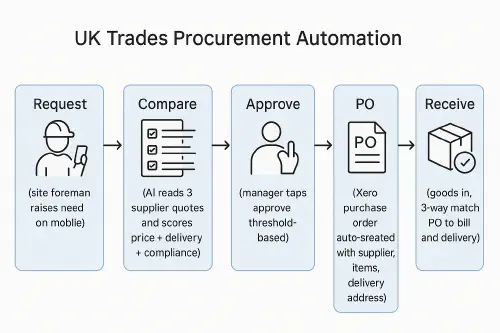
Flow: Request → Compare → Approve → PO → Receive for UK trades procurement
- Request: site foreman raises a need on mobile (form or app)
- Compare: AI reads 3 quotes and scores price, delivery, terms
- Approve: manager approves if under threshold
- PO: Xero PO created with items and delivery address
- Receive: goods in, 3‑way match to PO and supplier bill
Set up the basics in Xero
- Turn on Purchase Orders: Business → Purchase orders → New purchase order. Xero guide: Create a purchase order
- Contacts: add merchants you use weekly (Travis Perkins, Wickes, local timber yard)
- Items: set up frequent materials with codes and default accounts (e.g., TP-CLS38x89, PB12.5, COPPER-15MM)
- Tracking: use two Xero Tracking Categories such as Job and Cost type (Materials, Plant, Subbies)

Capture and compare supplier quotes automatically
Goal: stop retyping email/PDF quotes and remove guesswork.
Options that work now:
- Email parsing + sheet: forward quotes to a single mailbox, parse to a Google Sheet, use a scoring formula (price, delivery days, minimum order, carriage)
- Low-code tools: Power Automate or Make can watch your shared inbox, extract line items, and write into a “Quotes Inbox” table
- AI assist: use an LLM to read PDFs and map item, unit, qty, unit price, delivery, validity. Keep prompts simple and check against known item codes
Scoring example:
- Total price weight 60
- Delivery days weight 30
- Payment/return terms weight 10
Top resources to benchmark and sanity‑check:
- Compare The Build live merchant prices for common materials
- Procore material price tracker for trend direction


Approval rules that suit UK trades
Keep it quick for the team but controlled for the business.
- Under £250: auto‑approve to preferred supplier
- £250–£1,000: supervisor approval on mobile
- £1,000+: director approval with two taps
- Always flag: price spike over 15 percent against last 60 days, or delivery over 5 working days when a job start is booked
Send approvals via email, Microsoft Teams or WhatsApp, but store the audit trail with the quote and final PO.
Create the PO in Xero without retyping
Once the winner is approved, auto‑build the PO draft with:
- Supplier, delivery address and site reference
- Item codes, descriptions, qty, unit prices
- Delivery date promised
- Your job code in Tracking Category
Then push to Xero as a Draft Purchase Order so an office admin can spot‑check and Send.
Short how‑to video if you’re new to POs:
Receiving and 3‑way match that actually reconciles
When goods arrive:
- Mark items received against the PO
- Request the supplier bill referencing your PO number
- 3‑way match: PO vs delivery vs bill totals. Variances over 2 percent go back for a credit or an approved change
Zapier and similar tools can trigger checks like “if bill arrives before goods received, hold for review.”
Costing to jobs so margins stay honest
Don’t leave materials as uncoded overheads. Two simple patterns:
- Xero Tracking to job code, then report Materials by job each month
- If you use job management (Jobber, Tradify, ServiceM8): mirror item codes and let the PO sync into the job costs
Related reads in the Academy:
- Build a live job margin workflow: Tradify to Xero or QuickBooks without double entry
- Automate CIS returns from job sheets: Xero and QuickBooks setup, rules and statements
What are people saying on Reddit?
- Procurement pros discuss moving from manual spreadsheets to AI‑assisted quote comparisons: Better Way to Compare Supplier Quotes?
- Supply chain thread on comparing long price lists and using Excel models: Strategies for comparing long price lists
What’s new for Xero purchase orders in 2025–2026
Xero has made some platform updates worth knowing about:
- Price change (September 2025): Xero increased pricing on Grow, full and Ultimate plans. If you’re thinking of upgrading for more user seats or API capacity, factor that in.
- PO to invoice linking: your POs link directly to supplier invoices, reducing admin and improving cash flow visibility when you run reports.
- What’s still missing: Xero doesn’t yet allow you to allocate POs to Projects (a feature requested since 2022), and three-way matching (PO → Invoice → Payment) needs third-party apps. If those are critical for you, check out tools like ProcureDesk or similar.
- Developer changes ahead (March 2026): if you’re using Xero’s API for custom builds, Xero is moving to five app tiers (Starter, Core, Plus, Advanced, Enterprise) based on connections and data usage. No action needed now unless you’re actively developing integrations.
For your quote automation and job costing workflow, none of these changes affect your three-way match process or approval routing. Keep following your current PO templates and Tracking Category patterns.
FAQ
Ready to Transform Your Business?
Turn every engineer into your best engineer and solve recruitment bottlenecks
Join the TrainAR Waitlist