Build a WhatsApp onboarding chatbot for site starters: fast setup, scripts and compliance basics
Jump To...
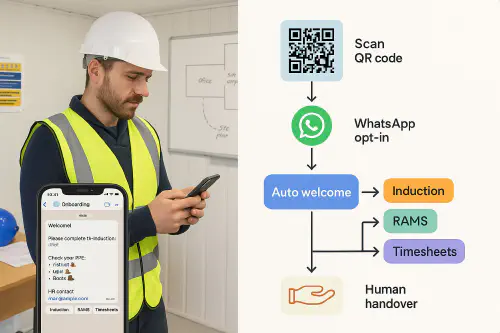
Foreman viewing a WhatsApp onboarding flow for site starters with QR opt-in and buttons for induction, RAMS and timesheets
Who this is for
Small contractors, subbie gangs and growing trades businesses who onboard new starters regularly and want to:
- Get inductions and paperwork done before arrival
- Share RAMS and site rules in a format crews actually read
- Capture attendance, right-to-work and next-of-kin with less back-and-forth
- Keep a clean audit trail without buying a heavy LMS
Quick answer
You can stand up a simple WhatsApp onboarding chatbot in a day using:
- WhatsApp Business App (basic auto replies and quick replies), then graduate to the WhatsApp Business Platform via a provider for buttons, templates and flows
- A Google Form for induction details and RTW documents, saving into Google Drive
- A QR poster at the site gate and in the site office to trigger the chat
Result: new starters scan a QR, opt in, get a welcome, tap buttons for Induction, RAMS and Timesheets, and you get structured data and evidence in your Drive.
What the chatbot actually does
- Sends an auto welcome when someone messages your site number
- Offers buttons: Induction, RAMS, PPE, Timesheets, Contact a Human
- Links to your Google Form and uploads folder for RTW/CSCS evidence
- Reminds them at set times (eg 6 pm before Day 1) with what to bring
- Hands over to a human if they type “help”
How it works end-to-end
- Worker scans a QR code on your poster or job sheet.
- They land in a WhatsApp chat and opt in.
- Auto message fires: “Welcome to [Site]. Tap a button to get started.”
- They complete the Induction Form, upload RTW/CSCS, and receive RAMS links.
- The bot logs completion and pings your site manager if anything is missing.
- On Day 1, a reminder auto-sends with PPE and arrival time.
Simple flow diagram
QR scan → WhatsApp opt in → Auto welcome → Buttons (Induction, RAMS, Timesheets) → Human handover if needed.
Step-by-step setup
- Get a dedicated WhatsApp Business number
- If you only need the basics, the WhatsApp Business App lets you set a Greeting and Away message, plus Quick Replies. Good for single-phone setups.
- For buttons, templates and proper chat flows, use the WhatsApp Business Platform via a provider (search “WhatsApp Business Platform”). You’ll get templates, buttons and web-based inboxes.
- Design your induction Google Form
- Sections: Personal details, RTW/CSCS, Next of Kin, Trade/Competence, Vehicle reg, PPE issued.
- Turn on file uploads and limit to allowed file types.
- Set the destination to a Google Sheet for tracking.
- Build your WhatsApp flows
- Buttons: Induction (link to the Form), RAMS (link to your PDF or Drive folder), Timesheets (link to your current process), Talk to a Human (routes to site manager).
- Set an auto follow-up if the form isn’t completed within 24 hours.
- Add a Day 1 reminder with map link and PPE list.
- Create a QR poster and handout
- The QR should open a “Click to WhatsApp” link to your business number with a short pre-filled message like “Start induction” to trigger the flow.
- Put posters at the gate, site office, and in pre-start packs.
- Logging and evidence
- Your Google Sheet becomes the training/induction log. Add columns for manager sign-off and expiry dates.
- Store all uploads in Drive with a folder per worker.
- Train your team
- Agree who handles escalations.
- Save Quick Replies for common questions (parking, facilities, hours).
Message scripts you can copy
- Greeting message: “Welcome to [Your Company] at [Site]. Tap a button to get started or type HELP for a human.”
- Reminder (evening before): “Tomorrow at [time]. Bring: CSCS card, PPE (boots, hi-vis, hard hat), photo ID. Report to [location].”
- RAMS summary: “Key points for [task]: isolation, permit to work, exclusion zone, dust extraction. Full RAMS: [link]. Reply ACK to confirm.”
- Human handover: “I’m handing you to [Name]. They’ll reply shortly.”
Compliance basics (UK)
- Keep it service-only unless you’ve marketing consent. WhatsApp messages count as electronic mail under PECR, so don’t add promos into onboarding messages without consent. See the ICO’s guidance on electronic mail marketing.
- If you move to the WhatsApp Business Platform, understand the 24-hour customer service window and template rules. See Meta’s docs on sending messages.
- Capture opt-in when people first message or via your QR landing. Keep a record. See Meta’s opt-in guidance.
- Limit personal data. Only collect what you need for induction/RTW. Store it in your company Drive/SharePoint, not personal phones. See ICO guidance on working from home security.
Costs and pitfalls
- Costs: WhatsApp Business App is free. Platform providers charge per message for templates and may add a platform fee. Keep most replies inside the 24-hour window to reduce costs.
- Pitfalls: collecting too much data in chat, no opt-out wording on broadcasts, storing photos on personal devices, and no human handover during working hours.
What are people saying on Reddit?
- WhatsApp automation tool suggestions and experiences: Reddit thread
- Building WhatsApp chatbots for real businesses: Reddit thread
Related Academy guides
- Bilingual toolbox talks on WhatsApp: 3-minute voice notes that crews actually understand
- How to set up QR code site induction and CSCS Smart Check that records checks
- Skills matrix for construction: link Google Sheets to your calendar to block unsafe bookings
FAQ
Can I do this without a provider?
Yes, but you’ll be limited. The WhatsApp Business App gives you greeting/away messages and quick replies. For buttons and templates, use the Business Platform via a provider.
What if a new starter doesn’t use WhatsApp?
Provide an SMS or paper fallback. Use the same Google Form link as a QR or short URL.
Is WhatsApp onboarding allowed under UK GDPR?
Yes, if you keep messages service-only, minimise data, have a privacy notice, and store evidence in company systems. Avoid marketing unless you’ve consent.
Can I attach PDFs in WhatsApp?
Yes. Keep RAMS PDFs small and readable on phones. Offer a summary and a link to the full doc.
How do I collect signatures?
Use your Google Form with a checkbox for declaration, or link to an e-sign tool for more formal sign-off.
Ready to Transform Your Business?
Turn every engineer into your best engineer and solve recruitment bottlenecks
Join the TrainAR Waitlist