Call tracking for trades: simple setup that won’t hurt your Google rankings
Jump To...
UK trade office desk with a phone and laptop showing different tracking numbers on a website
Quick answer
You can track which marketing brings in calls without messing up your local SEO. Put a tracking number as the Primary on your Google Business Profile (GBP) and your real business number as the Additional. Use Dynamic Number Insertion (DNI) on your website so visitors see a tracking number but search engines still see your canonical number (keep your real number in the raw HTML and LocalBusiness schema). Use local 01/02 or 03 numbers and follow Ofcom’s caller ID rules.
From January 2025, FCC consent rules now apply to call tracking—you need one-to-one consent for each communication channel in some cases, so confirm with your call tracking provider what’s needed for UK compliance. DNI done correctly doesn’t hurt local SEO when you keep the canonical number in HTML.
Helpful reads: Google’s phone number rules, Ofcom CLI guidance.
Who this is for
Small to mid‑size UK trade firms (plumbing, electrical, heating, roofing, joinery) that:
- Rely on the phone to win work
- Run Google Business Profile, Google Ads, vans/flyers, or a website
- Want to measure which channels actually book jobs without hurting rankings
How call tracking works (for trades)
- You buy tracking numbers and assign them to each source: Google Ads, GBP, website, van, leaflet.
- Calls to those numbers forward to your main line or hunt group.
- The system logs source, keyword/campaign (for ads), and call outcomes. Optional: record calls with notice.
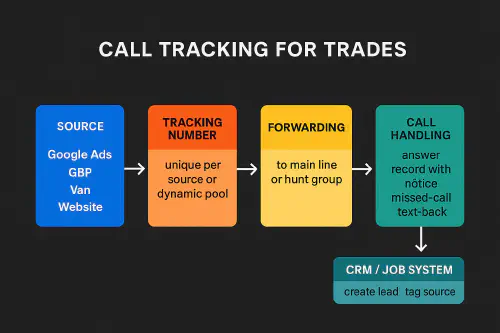
Flow diagram showing source → tracking number → forwarding → call handling → CRM/job system
Google Business Profile: do this, not that
Do
- Put the tracking number in Primary and your main business number in Additional. This is supported and keeps your identity consistent across the web. See GBP guidelines.
- Prefer a local 01/02 tracking number that matches your service area. It improves trust and click‑to‑call rates.
Avoid
- Only listing a tracking number with no Additional. If the tracking number changes or goes offline, you lose identity consistency.
- Premium‑rate or out‑of‑area numbers on GBP. They can reduce trust and risk edits.
Related Academy posts:
- Google Business Profile Q&A: turn common questions into booked jobs
- How to add WhatsApp and Text message buttons to your Google Business Profile
Website tracking with Dynamic Number Insertion
DNI swaps the phone number on your website based on where a visitor came from, so you can attribute calls. The trick is to keep your real number in the HTML and schema, and swap it with JavaScript for users.
- Keep your canonical number in the raw HTML and in your LocalBusiness schema.
- Use JS to display a tracking number to the visitor.
- Size your number pool roughly as peak concurrent visitors divided by 4 (minimum pool of 4) to avoid collisions. Guidance example: CallRail pool sizing.
Numbers to use (01/02 vs 03) and Ofcom rules
- 01/02 geographic numbers: best for local trust. Port them into your tracking/VoIP provider so you keep them long‑term.
- 03 national numbers: cost the same to call as 01/02 and are included in mobile bundles, good for wider service areas. See Ofcom call costs.
- Caller ID rules (Ofcom General Condition C6): outbound calls must present a valid, returnable number under your control. If you use a different presentation number (e.g., local presence), it must route back to you. More: Ofcom CLI guidance.
Routing and missed‑call text‑back
- Forward tracking numbers to a hunt group or ring your office + mobiles in order.
- Announce and record calls if you need training or dispute protection. Always tell callers you record and follow UK GDPR/PECR.
- Missed‑call automation: send a polite “Sorry we missed you” text with a booking link or ask for WhatsApp details. See our setup for different phones and VOIP lines: Auto text back for missed calls.
Reporting that actually helps decisions
Track these basics each week:
- Calls by source (GBP, Ads, website organic, van, leaflet)
- Answer rate and time to answer
- Booked jobs per source
- Cost per lead and cost per job (for paid channels)
With recording/transcription you can coach call handling and spot common objections. If you record, read the ICO’s guidance on consent and privacy.
Step‑by‑step setup checklist
- Pick numbers
- Choose a canonical number you’ll keep long‑term; port it into your system.
- Buy: one local tracking number for GBP, one for vans/print, and a pool for website.
- Configure GBP
- Primary = tracking number, Additional = canonical number.
- Test from a friend’s phone to ensure it forwards correctly.
- Install DNI
- Add the provider’s JS snippet site‑wide.
- Keep the canonical number in HTML and schema; test that Google still sees it (fetch render or use a text‑only view).
- Size pool to your peak traffic.
- Routing and recording
- Forward to hunt group; set open hours and voicemail.
- Add call recording message if used and store recordings securely.
- Missed‑call text‑back
- Set a rule: if missed during open hours, auto‑text within 60 seconds.
- Include your booking link or WhatsApp button.
- Weekly review
- Pull a calls‑by‑source report.
- Check answer rates and coach any weak spots.
- Move budget to the channels that book jobs, not just calls.
Useful links
- Ofcom CLI overview: Calling Line Identification
- Google Business Profile number rules: Guidelines for representing your business


Recommended video: Set up call tracking using number pools
FAQs
Is call tracking allowed on Google Business Profile? Yes. Put the tracking number in Primary and your real business number in Additional so your identity stays consistent. See GBP guidelines.
Will Dynamic Number Insertion hurt my SEO? Not if you keep your real number in the raw HTML and schema, and only swap with JavaScript for users.
What numbers should UK trades use? Local 01/02 for trust, or 03 for a national feel with normal call costs. Avoid premium‑rate on GBP.
Do I need to tell callers if I record calls? Yes. Play a short message before recording and follow UK GDPR/PECR. See the ICO for privacy guidance.
How many numbers in a website pool? Start with at least 4. Rough rule: peak concurrent visitors divided by 4. Adjust after a week of data.
Can I text people after a missed call? For service updates and booking, keep it transactional. For marketing texts, get opt‑in under PECR. See our guide: Auto text back for missed calls.
Ready to Transform Your Business?
Turn every engineer into your best engineer and solve recruitment bottlenecks
Join the TrainAR Waitlist