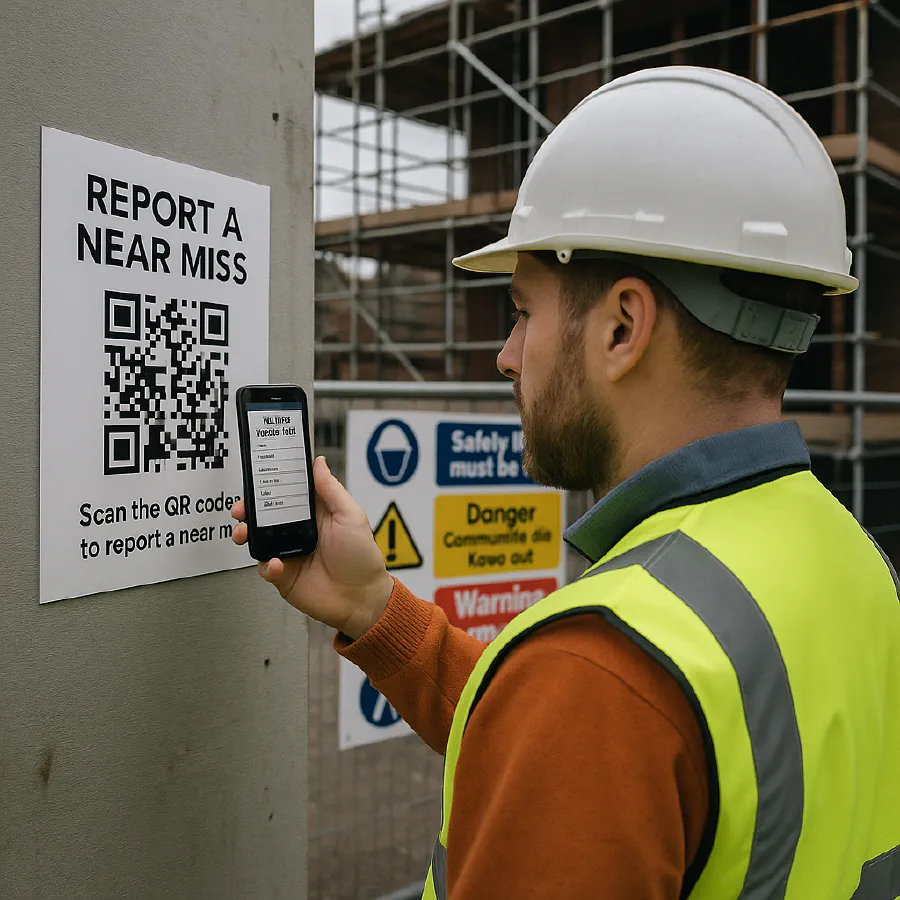
Near miss reporting on construction sites: simple steps, examples and a QR code setup
Jump To...
UK site supervisor scanning a QR code poster to report a near miss
Quick answer
- A near miss is a close call that could have hurt someone, damaged kit or the environment, but didn’t. Treat it as a warning sign.
- Make it easy to report: a QR poster that opens a 1 minute form on a phone.
- Have a light process: supervisor triage daily, fix the hazard, brief the team, and log trends weekly.
- It’s not usually reportable under RIDDOR, but recording near misses supports your duties under the Health and Safety at Work Act and improves your RAMS.
What counts as a near miss
In plain English: an event that didn’t result in harm, but easily could have. HSE’s Near‑miss Book explains why recording them matters for prevention and culture. See HSE guidance: Near‑miss Book.
Typical construction examples:
- Object falling from height misses a ground worker by inches.
- MEWP or telehandler reverses without a spotter, narrowly avoiding a collision.
- Trip over offcuts on a scaffold deck, catch yourself before falling.
- Using the wrong access equipment (e.g. standing on a crate) and nearly falling.
- Near hit on buried services after markings faded.
For more examples to use in toolbox talks, see: Sitemate examples.
A simple reporting flow that actually gets used
Below is a light, site‑friendly flow. Keep it consistent across jobs.
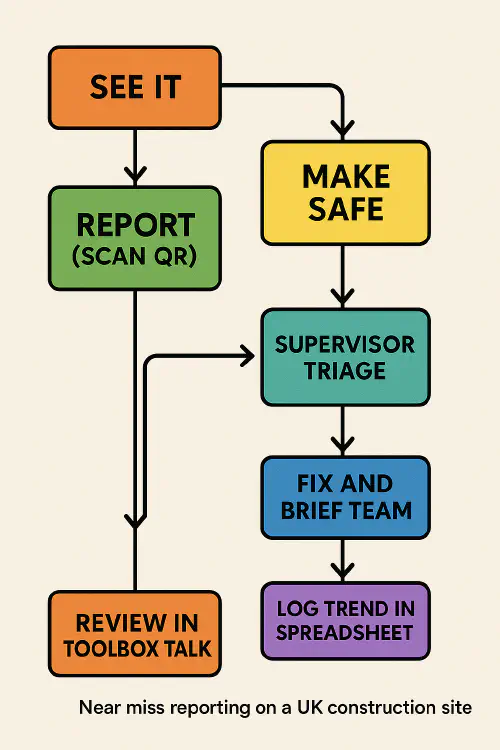
Near miss reporting flow: See it → Make safe → Report (QR) → Supervisor triage → Fix and brief → Log trend → Toolbox talk review
- See it: Anyone on site can spot and speak up.
- Make safe: Stop the task if needed, isolate or barrier the hazard.
- Report: Scan the QR and submit a 1 minute form: location, what happened, action taken, photos.
- Supervisor triage: Daily check of new entries. Decide fix and responsible person.
- Fix and brief: Put it right and tell the team at the next start‑of‑shift brief/toolbox talk.
- Log trend: A simple sheet or dashboard groups repeats by trade/area/phase.
- Review: Weekly review at the coordination meeting; update RAMS if a control needs changing.
Tip: Reward reporting. A brew token or monthly draw beats blame. More reports usually means improving culture, not a less safe site.
Set up a QR code report in 15 minutes
You can do this with free tools. Here’s a quick setup that works on any phone.
- Build a short form
- Use Google Forms or Microsoft Forms.
- Fields to include: site name, area/location, date/time, what happened, potential harm (people/plant/environment), immediate action taken, photo upload, reporter name or anonymous.
- Turn on email notifications to the site inbox.
- Generate a QR code
- Copy the form link and generate a QR code (Google Chrome’s “Create QR code” or any free generator).
- Print A4 posters: “Near miss? Scan here. 1 minute.” Add the Site Manager’s contact number for urgent issues.
- Create an auto log
- Set form responses to feed a Google Sheet or Excel Online table.
- Add basic filters and a pivot by category/area so trends pop out.
- Daily triage and weekly review
- Assign someone to check the inbox each day and allocate fixes.
- Bring the trend view to your weekly site meeting and toolbox talk.
Want help with QR inductions too? See our guide: How to set up QR site induction and CSCS Smart Check.
Good examples to train your team
Use one or two real examples each week in your briefing. The aim is pattern‑spotting.
- Falling objects: Tape measures, fixings, offcuts. Controls: toe boards, tool lanyards, exclusion zones.
- Plant movement: Reversing without a banksman. Controls: one‑way routes, spotters, amber beacons, pedestrian barriers.
- Access issues: Improvised steps, missing handrails. Controls: proper podiums/towers, inspection tags.
- Housekeeping: Debris on walkways. Controls: clear walkways policy, end‑of‑shift tidy, materials stands.
- Services: Unmarked live services. Controls: update service drawings and markings, permit to dig refresh.
A short video that explains near miss vs good catch: What do I need to know about near miss reporting?.
UK legal notes: HSE and RIDDOR
- HSWA 1974 duties: You must provide a safe system of work. Recording near misses helps you identify and control risks. See HSE’s overview: Near‑miss Book.
- RIDDOR: Near misses are not normally reportable unless they meet a defined “dangerous occurrence.” Check HSE’s RIDDOR list of what to report: RIDDOR guidance.
- Client/principal contractor requirements: Many sites require near miss reporting as part of the Construction Phase Plan and RAMS reviews.
Useful context pieces:
Common pitfalls and how to fix them
- Forms are too long: Keep it to 6 to 8 fields. Add photos to say more with less typing.
- No feedback loop: Always brief what changed. People stop reporting if nothing happens.
- Blame culture: Focus on conditions and controls, not the person.
- No owner: Assign a named person each week to triage and chase fixes.
- Not feeding RAMS: If you see repeats, change the control in your RAMS and brief the team. See our RAMS guide: RAMS simple steps and template.
Templates and related guides
- Toolbox talks: HSE expectations and free 5‑minute scripts: Toolbox talks UK
- Construction Phase Plan: essentials and checklist: CPP made simple
- Site Diary: free template and fast digital setup: Construction site diary template
- Training matrix with expiry reminders: Training matrix template
FAQ
Is near miss reporting a legal requirement in the UK?
Not generally under RIDDOR, unless it meets a defined dangerous occurrence. But under the Health and Safety at Work Act you must manage risks; logging near misses is a practical way to do that and many clients require it. See HSE: RIDDOR and Near‑miss Book.
What’s the basic procedure to report a near miss on site?
Make safe, scan the QR, submit the short form with a photo, tell the supervisor. Supervisor triages daily, assigns a fix, briefs the team, and logs it for trend review.
Do near misses go in the site diary?
Yes. Record the finding and fix in your site diary and carry actions to the coordination meeting. Update RAMS if you spot repeating issues.
How can we improve reporting rates?
Keep the form short, allow anonymous reports, share quick wins in toolbox talks, and thank reporters. Small rewards help.
Do environmental or property damage near misses count?
Yes. Log people, plant and environmental hazards. Some environmental events may have client reporting requirements even if not RIDDOR.
Do we need a permit‑to‑dig refresh after a services near miss?
Often, yes: re‑locate and re‑mark services, refresh the permit briefing, and update RAMS/CPP controls.
Ready to Transform Your Business?
Turn every engineer into your best engineer and solve recruitment bottlenecks
Join the TrainAR Waitlist