Permit to work on construction sites: QR setup, WhatsApp approvals and hot work/confined space templates
Jump To...
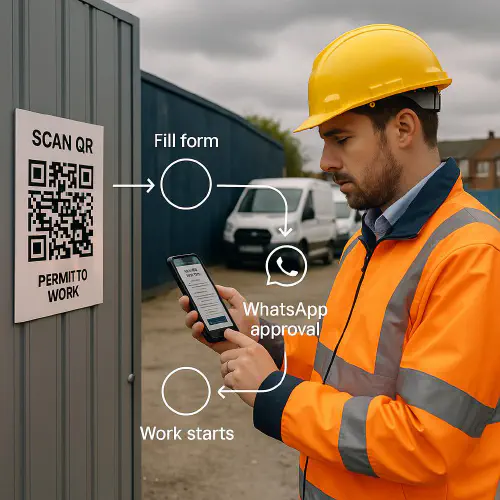
Supervisor scanning a QR at a site gate to raise a digital permit to work with WhatsApp approval
Quick answer
A permit to work (PTW) is a formal, documented control for high‑risk tasks. On UK sites you can run PTW digitally using a simple QR code at the work area that opens a form, routes to a manager on WhatsApp for approval, and issues the permit back to the crew — with time limits, conditions and a close‑out checklist. This gives you a clear audit trail and faster control than paper.
- Core guidance: HSG250 covers how to design PTW systems and roles; HSE’s page on Permit to work systems explains the principles. For hot work, see HSE construction fire guidance and HSG168; for confined spaces, the ACOP L101 applies.
Who this is for
- Principal contractors who need consistent controls across multiple sites
- Subcontractors who are often stopped by paperwork delays and want a faster, compliant process
- Site managers who want approvals on their phone and a live log without chasing bits of paper
What HSE means by a permit to work
A PTW is a formal written safe system of work used to control high‑risk activities. It states exactly what work is done, when, the hazards and control measures, the isolations required, who is authorised, and when the area is handed back. It supports, not replaces, your risk assessment and method statement.
- Read HSE’s PTW overview: Permit to work systems
- COSHH basics page on permits: Permits to work
- Detailed good practice: HSG250 (permit-to-work systems). If you buy one book on PTW design, it’s this.
Where permits are typically needed
Common examples on UK construction sites:
- Hot work: welding, cutting, grinding. See HSE’s construction fire safety and welding guidance
- Confined space entry: tanks, service ducts, sewers. See ACOP L101
- Electrical isolation and live testing
- Excavations near services; some firms operate Permit to Dig in addition to RAMS
- Roof work and fragile surfaces (often handled by RAMS plus a PTW on larger jobs)
Useful references:
- HSE construction process fire risks: Process fire risks
- Fire safety in construction, HSG168 (3rd edition)
- Confined spaces ACOP L101 and INDG258 overview: Confined spaces
How the QR + WhatsApp permit flow works
- Operative scans a QR code posted at the work area or on the task sheet
- Opens a mobile‑friendly form capturing scope, location, dates, hazards, isolations, controls and attachments
- On submit, the form pings a WhatsApp chat to the named issuer/manager with the details and Approve/Reject quick actions
- If approved, the permit PDF is generated with a unique ID, validity window and conditions. A copy is sent to the crew WhatsApp group and to site email.
- During the job, conditions can be paused/updated. On completion, the close‑out checklist is sent to the same chat. The issuer inspects and closes the permit (hand‑back recorded).
Why WhatsApp? Everyone has it, photos/voice notes are easy, and you get time‑stamped evidence. You can later upgrade to dedicated PTW software if needed — this flow gets you compliant quickly.
Flow diagram showing QR scan to form, WhatsApp approval, permit issued, close out
Step-by-step setup
- Create the form
- Use Google Forms or Microsoft Forms. Include: work description, exact location, dates/times, hazards, isolations, controls, attachments (RAMS, photos), issuer, acceptor, standby/fire watch names, rescue plan (for confined spaces), signature fields.
- Automate routing
- Use Make or Zapier to send submitted forms to WhatsApp via a shared inbox tool or WhatsApp Business API provider. Include Approve/Reject buttons or clear instructions.
- Generate the permit PDF
- Merge the form data into a Google Doc or Word template to create a numbered permit with conditions and validity. Save to Drive/SharePoint.
- Post QR codes
- Print QR codes that deep‑link to the correct form for each work area. Use weather‑proof sleeves near the workface and in the site office.
- Train roles and test
- Walk the team through issuer, acceptor and fire‑watch/attendant responsibilities. Do a dry run before go‑live.
- Log and audit
- Store permits in a folder per site with automatic file names: SITE-PTW-YYYYMMDD-SEQ. Keep a live register with status (draft/approved/active/paused/closed).
Hot work permit template essentials
Minimum items aligned with HSE fire guidance and welding pages:
- Scope, exact location, date/time window
- Hot work method and equipment (e.g. gas cutting, arc welding)
- Isolation of combustibles and services; housekeeping and fire‑resistant sheeting
- Fire watch named person during work and post‑work watch for at least 30 minutes; extend to 60 minutes where smouldering risk exists
- Extinguishers/fire blanket present, checked and suitable
- Gas detection if required; ventilation plan
- PPE including eye/hand/skin protection and face screens where needed
- Weather and wind checks if working externally
- Final area inspection and hand‑back sign‑off
Useful HSE links: Process fire risks, welding risks guidance, and HSG168.
Confined space entry permit essentials
Aligned with ACOP L101 and INDG258:
- Justification that entry is unavoidable; alternatives considered
- Description of the space and specified risks (oxygen deficiency, toxic or flammable atmospheres, flooding, free‑flowing solids)
- Isolation of fluids/energy; lock‑out/tag‑out
- Atmospheric testing plan: O2, flammables, toxics; continuous monitoring where risk demands
- Ventilation method and run time before entry
- Entrant competence, attendant/standby named and communication method
- Rescue plan, kit on site, rescue team competence and response time
- Time limits, shift handover, and revalidation if conditions change
- Close‑out and hand‑back
Key HSE sources: ACOP L101 and Confined spaces introduction.
Records, audits and sign-off
- Keep permits for at least the life of the project; longer where client or insurer requires
- Sample audit weekly: check that permits match site activities, controls are evidenced with photos, and close‑outs are completed
- Tie permits to your site diary and near‑miss reports so you can demonstrate the golden thread of decisions. See our Build an AI site diary from photos and voice notes and Near miss reporting articles.
FAQs
Is a permit to work legally required on UK construction sites?
There isn’t a single law saying “you must have a permit,” but HSE expects a formal system for high‑risk work. A PTW is a recognised way to demonstrate a safe system of work alongside RAMS.
Who can issue and accept a permit?
Competent, authorised persons who understand the hazards and controls. Train issuers and acceptors; brief fire watches/attendants on their duties.
How long should a hot work fire watch last?
At least 30 minutes after work finishes. Extend to 60 minutes if there’s a risk of smouldering or concealed ignition.
Can I run PTW over WhatsApp and still be compliant?
Yes, if roles are clear, approvals are recorded, and permits show conditions, timings and close‑out. WhatsApp provides time‑stamped evidence; store the final permit and photos in your document system.
What about data protection?
Avoid collecting unnecessary personal data. Limit permits to names, roles and signatures. Store records securely with access controls.
Ready to Transform Your Business?
Turn every engineer into your best engineer and solve recruitment bottlenecks
Join the TrainAR Waitlist