QR skills matrix for construction: live sign‑offs on site that update competence and block unsafe bookings
Jump To...
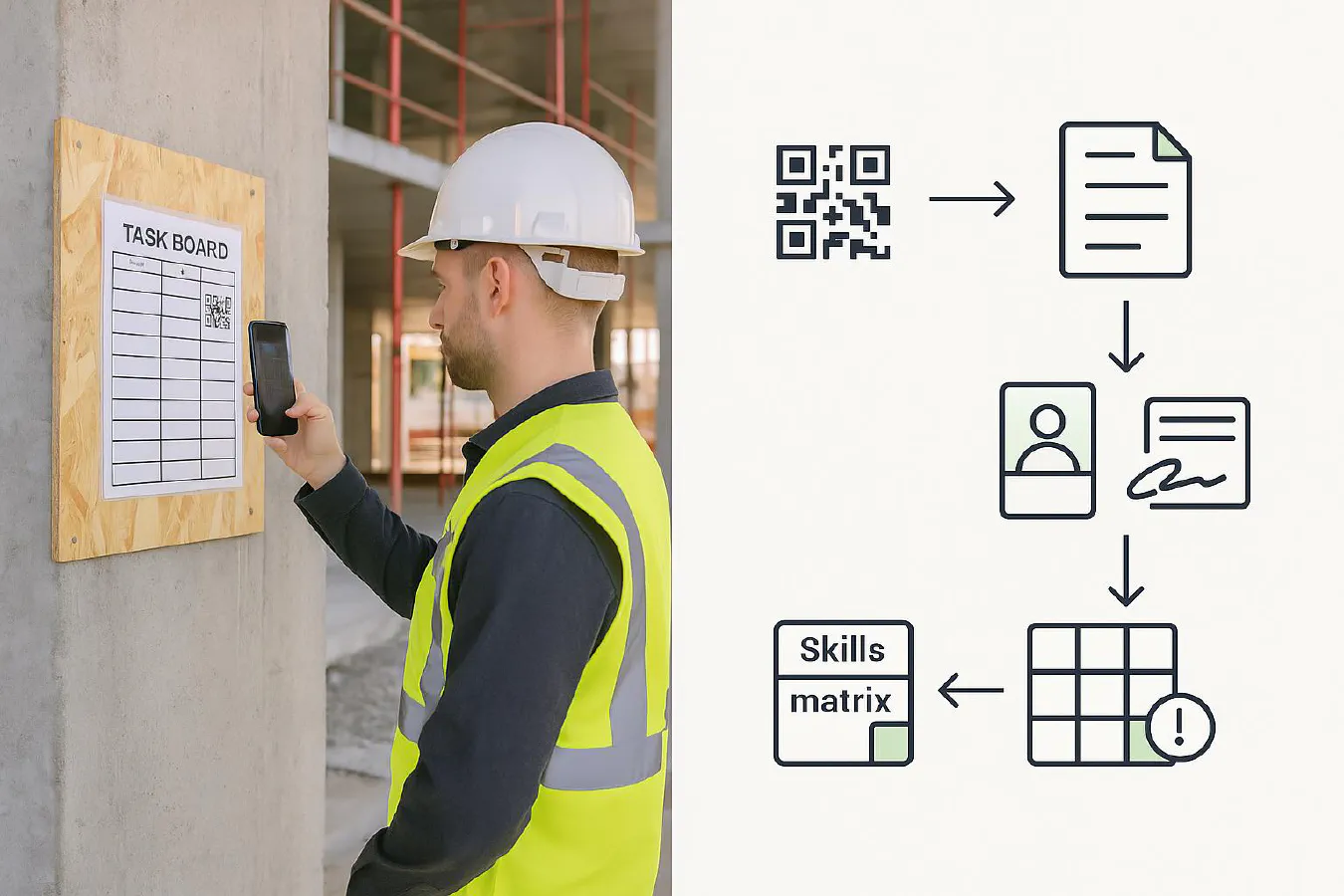
Supervisor scanning a QR at a task board; flow arrows to a form and live skills matrix update
Quick answer
You can run a live skills and training matrix without expensive software by giving every worker and high‑risk task a QR code that opens a prefilled form on a phone. Each scan logs who, where and when, captures a quick sign‑off (photo + signature), and updates a central matrix. Dispatch and scheduling can then check the matrix before assigning jobs so unsafe bookings are blocked.
- Uses tools you already know: Google Sheets or Airtable for the matrix; a simple form tool for capture; WhatsApp to nudge people.
- Meets UK expectations on competence evidence: combine card checks, training records and supervised sign‑offs. See HSE guidance on competence and CDM 2015 duties for skills, knowledge and experience. Read: HSE: What’s competence?, CDM 2015 Reg 8.
- CSCS verification belongs at the door: scan cards with CSCS Smart Check and record the check method/date.
Who this is for
- Small to mid contractors who currently keep training records in a spreadsheet or ring‑binder.
- Firms that want clearer proof of competence and faster sign‑offs on busy sites.
- Businesses that dispatch engineers and need a quick way to stop unsafe job bookings.
How it works
- Worker QR: a badge or phone wallpaper that opens a prefilled form with their ID.
- Task/area QR: at the scaffold tag, MEWP charge bay, or hot‑work zone to log briefings and permits.
- Form submission writes to a central table. A rollup updates the latest sign‑off and flags gaps.
- Schedulers check the matrix (or an automation checks for you) before assigning jobs.
Diagram you can mirror on a whiteboard: Scan QR → Prefilled form opens → Photo + signature → Record in matrix → Scheduler sees green/amber/red.
Step-by-step setup
Pick a base (Airtable or Google Sheets) and one form tool (Airtable Forms, Google Forms, or Fillout). Airtable gives you nicer relationships between people, tasks and sign‑offs; Google is fine if you want simplest.
- Build the matrix
- People table/sheet: Name, Company, Role, CSCS number, Card expiry, Email, Phone, Unique ID, Evidence folder link. Add fields for key competencies by role.
- Sign‑offs table/sheet: Person, Task/Area, Site, Timestamp, Supervisor, Photo, Signature, Notes, Pass/Fail.
- Roles table (optional): Role → required tickets/training and refresh dates.
- Make the form
- Include hidden fields for Person ID and Site. Prefill them using query parameters. In Airtable use ENCODE_URL_COMPONENT to build safe prefill links. Guide: Airtable forms and prefill.
- Require a photo and signature on higher‑risk tasks.
- Generate the QR codes
- Option A: Make a unique prefilled URL per person and per recurring task/area, then convert to QR. miniExtensions has a simple Airtable QR generator. See: miniExtensions QR Code for Airtable.
- Option B: Use a short script to call a QR API and attach the image to your record.
- Put QRs where work happens
- Print worker badges and site posters. Add a QR to your scaffold tag board or hot‑work station with “Scan before starting.”
- For access control, verify cards with CSCS Smart Check. Store the check as an evidence note.
- Link to scheduling
- If you schedule from a calendar, create a simple rule: only book an engineer if the matrix shows green for that task in the last X months.
- If you use field apps, run a quick lookup against the matrix before dispatch. We show a full scheduling build in this article: Skills matrix for construction: link Google Sheets to your calendar to block unsafe bookings.
Optional automations
- 90/30/7 day reminders before CSCS/NPORS expiries.
- WhatsApp prompts after toolbox talks so crews submit the QR sign‑off. See our guide: Bilingual toolbox talks on WhatsApp.
- Incident → microlearning: turn a near miss into a 2‑minute refresher and require sign‑off next morning.
Capture the right evidence
HSE says competence is training, skills, experience and knowledge applied safely; supervision matters too. Use a mix:
- Identity and card checks: record CSCS or partner scheme check with Smart Check and date/time. CSCS Smart Check info: CSCS website.
- Tickets and training: NVQ, NPORS/CPCS, CISRS, IPAF, plus HS&E test where relevant. Map to CITB competence frameworks or your own risk‑based list. See: CITB Competence Frameworks.
- Task sign‑offs: short, supervised sign‑off with photo and signature for critical tasks or permits.
- Toolbox talks: keep proof of attendance and a quick quiz. HSE’s definition of a toolbox talk and free topics: HSE toolbox talks.
Make it stick on site
- One minute rule: the whole scan → photo → submit should take under a minute or it will be ignored.
- Put QRs at the point of work: scaffold tags, plant keys board, charging bays, hot‑work station.
- Supervisor of the day: rotate who chases missed scans; post daily compliance in WhatsApp.
- Version control: store your latest toolbox talk scripts and RAMS behind the same QR so crews always get the current version.
Real‑world examples you can learn from
- Balfour Beatty used QR‑coded permit armbands linked to BIM 360 so supervisors could verify permits on the spot. Read: Construction Management case note.
- Sisk at Wembley put QR codes at each flat handover point to access drawings and complete QA forms, cutting paper and delays. Read: BIM+ case study.
Security and GDPR
- Keep personal data to the minimum needed; state what you’re collecting on the form and why.
- Restrict who can generate or edit QR codes; watermark posters and check for tampering. Be aware of QR scams in the UK and train staff to only scan trusted site posters.
- Store evidence in a secure drive with access by role. Delete outdated data in line with your retention policy.
What are people saying on Reddit?
- “Corporate toolbox talks are a joke” thread highlights the importance of short, relevant briefings and practical follow‑up rather than paperwork for its own sake. Read: r/electricians.
- Safety pros discuss adding mental health into toolbox talks, with simple prompts and signposting that crews actually use. Read: r/SafetyProfessionals.
FAQ
Is this accepted by UK clients and HSE?
Yes. HSE doesn’t mandate a specific system; they want proportionate, risk‑based evidence of competence and supervision. QR sign‑offs plus CSCS checks and training records meet that bar when done properly. See: HSE competence and CDM 2015.
Do I need Airtable, or will Google Sheets do?
Sheets is fine for simple setups; Airtable makes relationships, photos and signatures smoother. You can start in Sheets and move later.
Can I prove attendance at toolbox talks with this?
Yes. Put a QR on your talk sheet; attendees scan, answer a 1‑question check, and sign. Store the record with the talk title and date. See HSE’s toolbox talk resource for topics: HSE toolbox talks.
Any video to help build the QR workflow?
This walkthrough shows QR creation, prefilled forms and reminders in Airtable: Airtable Maintenance Tracker – QR Codes, Automations and Forms.
How do I handle expiring cards and tickets?
Track expiry dates in the matrix and set 90/30/7 day reminders. If a card lapses, your scheduling rule should flip to red and block the booking until updated.
Ready to Transform Your Business?
Turn every engineer into your best engineer and solve recruitment bottlenecks
Join the TrainAR Waitlist